Kalpesh
0%
Gamified
Mobile app
Web app
UX UI design
Client:

What is Fyule Video Lab
Fyule is revolutionizing education by providing art-integration in school syllabus with video making. Fyule had a curriculum built on video-making, but had to rely on complex third-party apps that weren't designed for children.
Fyule Video Lab is a suite of three mobile apps, a video editor, a stop-motion animator, and a video showcase platform, designed specifically for K-12 students, with an admin dashboard for teachers and school administrators to manage users and content across the ecosystem.
I led the UX UI design for the product lineup for the project.
TL;DR
Challenge
Solution
An ecosystem of 3 apps, with a cohesive design system and gamified reward mechanism. Simplified for kids to kickstart and structured for a school & parents to trust. The product lineup eliminates Fyule's dependency on third party apps.
Here's what the 3 apps looked like


Check out the live apps below


Now let's dive deeper…
Discovery
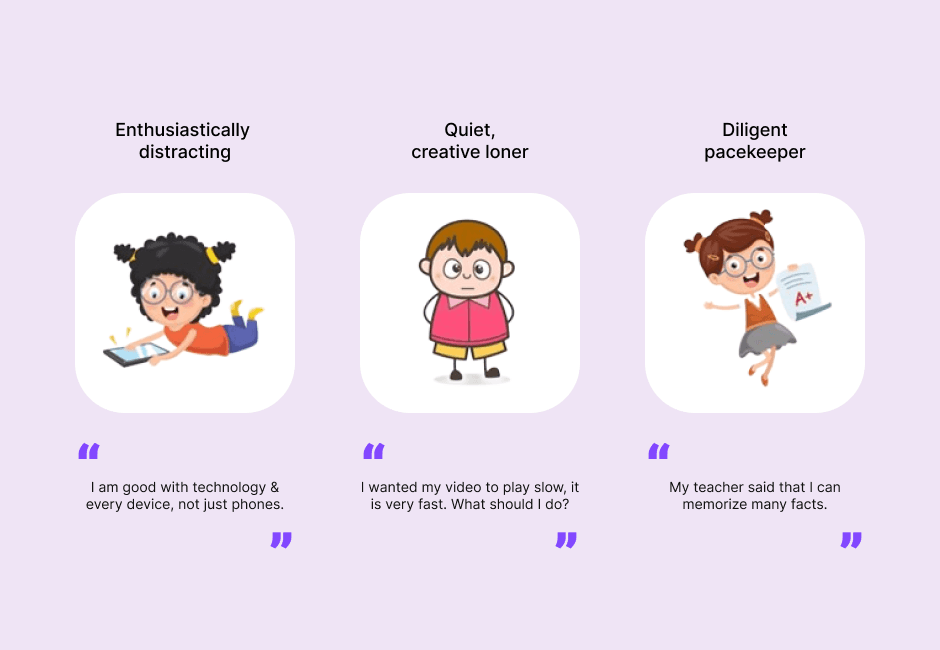
Research synthesis revealed 3 distinct creator personas among students. While some of them were able to navigate the existing apps, others needed handholding throughout the process.
The existing apps were designed for grown ups and became overwhelming for the students. Additionally, it lacked alignment with the syllabus developed by Fyule, which created friction for students and teachers.

Stakeholder alignment
Designing a product lineup 0 to 1 specifically for students called for attention to clarity with objectives and direction. We conducted co-creation workshop with cross-functional stakeholders which included C-suite executives, content developers, teachers and trainers to map out their goals, expectations and priorities.
This helped in drafting design brief which balances usability and business goals
Insights
Children tend to lose interest when an interface feels like an obstacle. This results in lack of exploration and then abandonment. Hence, the apps needed to have strong incentives for engagement and exploration without being overwhelming.
Teachers need control without complexity. The apps need align with the syllabus structure across different standards, sections and subjects.
With the goal to empower kids to learn, create and share their videos, we focused on 6 principles:
Incentive to create
Indulgence to play
Handhold the offline setup
Constructive progression
Reduce adult dependency
Build for limited dexterity
Product design
The first phase started with designing the stopmotion animator with defining the features and then prioritizing the must haves and good to haves and then drafting an information architecture.
For the visual design, we wanted the app to feel playful and fun for the students, so I explored various options landing on a visual style inspired by gaming consoles.
For the visual design, we wanted the app to feel playful and fun for the students, so I explored various options landing on a visual style inspired by gaming consoles.

To ensure the visual language remains consistent across the products, I developed a comprehensive design system covering component library, colour tokens, typography scales, iconography, spacing rules, etc. All built in Figma with named variants and states for developer handoff.

Fyule Stopmotion Animator
Designed to simplify stopmotion animation, this app empowers young minds with an intuitive editing interface.
Add and edit elements to customize the animation
Enhance the outcome by finetuning fps, filters, greenscreen, etc.
Explore the app and earn rewards
Fyule Video Editor
The video editor is designed to boost the videomaking with specialized template library to edit videos effortlessly.
Customizable templates to reduce initial friction
Content & element library based on classroom subjects
Polish the video with easy timeline-based editing
Fyule Video Lab Showcase
Fyule Video Lab offers a stage for young creators to share their work. They can also find lessons and participate in contests & masterclasses.
Share the creation and build a work portfolio
Engage with other creators & communities
Create & manage profile with trump-card based UI
Complete lessons & projects based on school curriculum
Testing
Testing happened through informal feedback sessions with stakeholders rather than structured usability testing with students directly. Iterations were driven by close collaboration with the Fyule team, reviewing builds, identifying friction points, and refining until the interactions felt right.
Reception and impact
The apps were launched iOS, Android, and web forming Fyule's product ecosystem and serve as an important facet of their video-making driven curriculum for schools.
Fyule app lineup works on freemium subscription model where additional features and content are available for subscribers
Schools across India partnered with Fyule to bring video-making into their curriculum fostering creative expression in young minds
40,000+ downloads collectively across the app suite
4.5+ star ratings across app stores
Reflection
Designing a multi-product ecosystem from zero taught me something specific: the design system is the product, in a way that single-app projects don't surface. Every decision made at the system level rippled across five surfaces simultaneously. Getting it right early meant everything moved faster. Revisiting it meant revisiting everything.
If I were doing it again: structured testing with actual students, even one round, would have replaced a lot of assumption-based iteration. And I'd involve teachers in the research phase earlier — not just as approvers, but as co-designers of what oversight actually needs to look like.
The Fyule project confirmed that designing for constrained, non-expert users is one of the most demanding and rewarding kinds of product design. Simplicity at this level is not the absence of decisions — it's the result of making more of them.